Rendering Terraria in 3D
January 31, 2018
In 2014, part of my job was to bring Terraria into the 3rd dimension and have it be fully playable. In this blog, I will briefly overview the process I went through to achieve the effect.
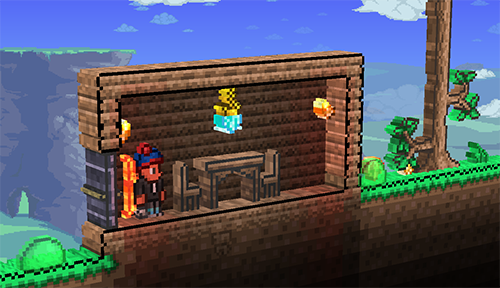
I first needed to figure out how I was going to add depth to a 2D game. It’s simple, extrude the textures that are drawn to screen. The idea was simple enough. The implementation, not so much.
Knowing what I know now, I would have tried a ray-tracing solution to extrude textures similar to how parallax occlusion shaders work. I was not aware of this technique at the time.
Mesh Generation
My first attempt was the most straight forward. Generate a 3D mesh based on a texture. I would sample each pixel in the texture and figure out where geometry needed to be placed and what colors the vertices needed to be. As you can probably guess, this is extremely slow! First the texture is rendered by the GPU and now the CPU needs access to that texture to figure out how to build the mesh. The texture has to be transferred from GPU memory to system memory. The CPU iterates over every pixel which is also quite slow. The CPU figures out our mesh data and then sends that data over to the graphics card. Moving all this data between CPU and GPU is slow and we are doing it multiple times every frame.
Ideally, we keep everything on the GPU. The biggest hurdle was trying to figure out how to generate mesh data on the GPU. I was limited to shader model 2. I could not use geometry shaders and I could not sample textures in the vertex shader. The breakthrough I had was to create a grid mesh. Every cell in the grid would represent a pixel. This would result in far more polygons, however, we could keep this grid in a buffer on the GPU. The CPU creates the grid once, hands it off to the GPU, and never touches it again.
Now we have this grid, but what do we do with the polygons that represent transparent pixels? HLSL/CG has a function called clip. We can decide in the fragment shader if we want to throw that fragment away. If we call the clip function, the fragment is written to neither the frame buffer nor the depth buffer.
Visual Tweaks
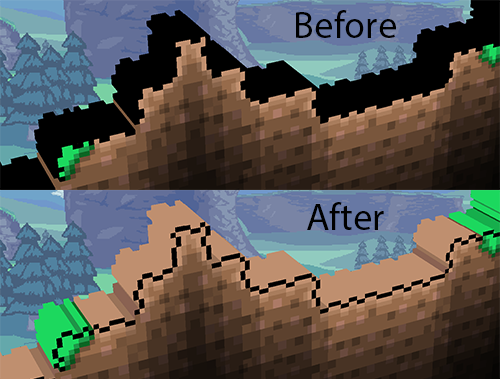
So far things are still a bit slow and we now have a new problem. Terraria’s sprites are outlined with black pixels. This makes the edges of our extrusion black and not looking very nice. I want to sample one pixel further inside the outline of the texture to give our extrusions nice colors. I wrote a shader that finds these inner pixels and outputs new textures for our grid to sample.
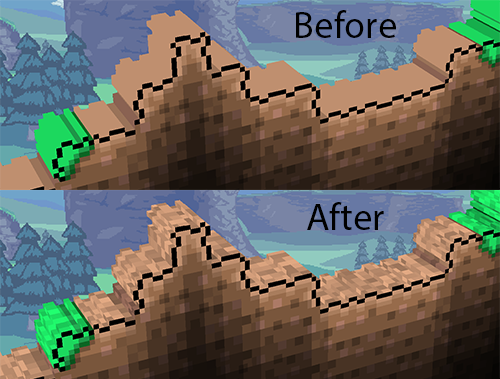
This is a nice improvement but our extrusions look flat. To fix this, I apply a noise map onto our extrusions. I have to inform our shader where the camera is in the 2D world so that the noise map’s position in the world is persistent.
Layers
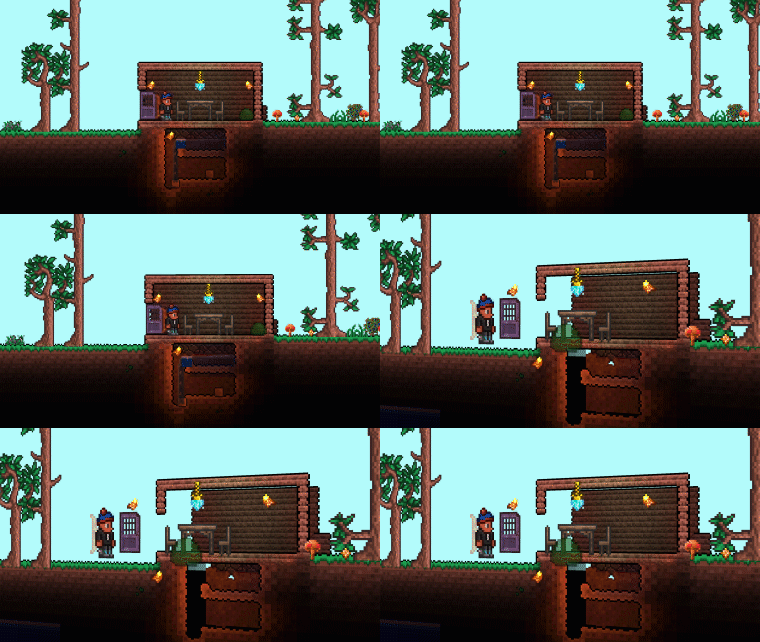
We are getting closer. We need to start putting elements on their own depth planes. Terraria has a number of render textures it uses when calculating lighting. There is a texture for tiles, walls, water, npcs, and players. We will use these textures as our layers.
Putting each layer on its own plane gives us this result!
Input
Visually we’re in pretty good shape. Next we need to project the cursor into our 3D world so the player can click around. Our 3D pipeline had a series of matrices to bring our geometry from world space, to view space, to clip space. We simply multiply our cursor coordinates by these matrices. The layer the cursor is hovering over must be taken into account as each layer has a different depth.
Optimization
Things are looking pretty good at this point. Our FPS is still pretty bad. Time for optimization. The first thing I played with was the grid. Instead of one giant grid for every pixel, I would use one smaller grid and render every extrusion one section at a time. There was a sweet spot for getting the best FPS. Now that I was rendering the extrusions in sections, it didn’t make sense to do a render pass on a section that did not contain any outlines. I wrote a shader that would render texture outlines and this new texture would be downsampled until it was a map of what sections of our original texture had outlines. The CPU would check each pixel on this small map to figure out which sections to render our grid on.
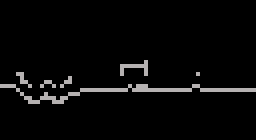
This is an example of a section map for the tiles layer. You may notice some parts missing from the map. For reasons outside the scope of this overview, the extruder does horizontal and vertical polygons on separate passes.
Conclusion
With those optimizations complete, we have a playable 3D Terraria at an acceptable frame rate! This process took me a few months of R&D to pull off. There is a lot I would change if I were to do it again. You can see the effect in action in the first part of the video below. Thanks for reading!